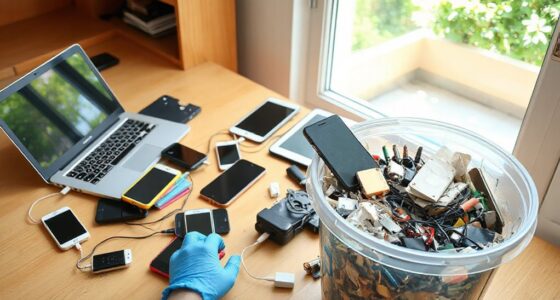
If your phone’s battery drains quickly or it won’t hold a charge, it’s a sign you may need an upgrade. Poor camera quality, blurry or dull images, and struggles with the latest apps also indicate your device is aging. If your phone crashes often or can’t run new software smoothly, it’s time to contemplate replacing it. Keep an eye on these signs to decide when an upgrade makes sense—more helpful tips await if you keep exploring.
Key Takeaways
- Battery life is significantly shorter than when new, indicating aging or degraded capacity.
- Camera quality no longer meets your expectations for photos or videos.
- Apps frequently crash, or your device can’t support the latest software updates.
- The device struggles with daily tasks, slowing your productivity or user experience.
- You experience security vulnerabilities or lack access to new features and technological advancements.

Deciding whether to upgrade your smartphone can be tricky, especially with new models constantly hitting the market. You might find yourself questioning if the current device still meets your needs or if it’s time for a change. One of the first things to contemplate is battery longevity. Over time, your phone’s battery naturally degrades, causing it to hold less charge and requiring more frequent recharges. If you notice that your device can’t last a full day without needing a charge, or if it suddenly drains faster than usual, it’s a clear sign that your phone’s battery health is declining. Replacing the battery might be an option, but if your device is several years old, upgrading could be more cost-effective. A new phone often offers a fresh, longer-lasting battery that can keep up with your daily routine without constant worry.
If your phone’s battery drains quickly or can’t last a full day, it might be time to consider an upgrade.
Another key indicator is camera quality. If capturing photos and videos has become less satisfying—images look blurry, colors are dull, or low-light shots are grainy—you might be perceiving the limitations of your current camera. Modern smartphones continually enhance camera technology, offering better image stabilization, higher resolutions, and improved low-light performance. If these improvements matter to you, upgrading can substantially boost your photography experience. Even if your current device still functions, the desire for better photo quality or advanced features like multiple lenses, larger sensors, or enhanced zoom capabilities could be the motivation you need to make a change.
Beyond battery and camera, you should also evaluate whether your phone keeps up with your daily tasks. Is it slow to open apps, frequently crashes, or struggles with the latest software updates? These issues can hinder your productivity and enjoyment. If your device is outdated and no longer receives updates, it becomes more vulnerable to security risks and compatibility issues. Upgrading guarantees you get the latest features, security patches, and software support, making your overall experience smoother and more secure. Recognizing that software updates can extend your device’s lifespan and improve performance is an important aspect of this process. Additionally, an outdated device might not be able to support the increasing demands of new technologies, which can further limit its usefulness over time. Keeping your device current can also help you stay aligned with technological advancements and maintain optimal performance. It’s also worth noting that a lack of support for newer features can lead to frustration and limit the utility of your device.
In the end, ask yourself if your current smartphone still improves your daily life or if it’s holding you back. If battery life is unreliable, camera quality no longer meets your standards, or your device can’t handle the latest apps and updates, it’s probably time for an upgrade. Newer models are designed to keep pace with evolving technology and your changing needs. Staying informed about your device’s performance helps you decide whether investing in a new phone is worthwhile, preventing you from holding onto outdated tech that no longer serves you well. Understanding these performance indicators can guide you in making a well-informed decision about when to upgrade.
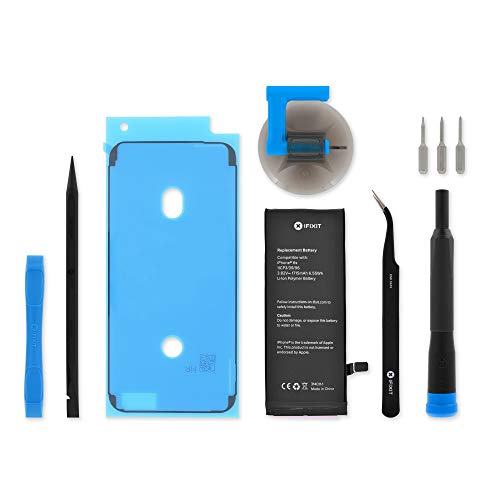
iFixit Battery Compatible with iPhone 6s – Repair Kit
This replacement battery is what you need to bring that dead smartphone back to life. The Fix Kit…
As an affiliate, we earn on qualifying purchases.
As an affiliate, we earn on qualifying purchases.
Frequently Asked Questions
How Often Should I Consider Upgrading My Smartphone?
You should consider upgrading your smartphone every 2 to 3 years, especially if you notice declining battery health or deteriorating camera quality. As batteries lose capacity, your phone won’t last as long between charges, and poor camera quality can impact your photos. If these issues bother you and updates no longer improve performance, it’s time to upgrade. Staying current guarantees better features, security, and overall user experience.
Are There Signs Beyond Performance Issues That Indicate an Upgrade?
You might need an upgrade if your battery health has considerably declined, leading to faster draining or shorter usage times. Also, if your camera quality no longer meets your needs—say, blurry photos or poor low-light performance—you should consider upgrading. Beyond performance issues, these signs show your current device may be outdated, affecting daily use and photo quality. If these problems bother you, it’s time to look for a new smartphone.
Can Software Updates Extend My Current Phone’s Lifespan?
Yes, software updates can extend your phone’s lifespan. They often include security patches, bug fixes, and performance improvements that help mitigate issues caused by battery degradation and camera quality decline. Updating your device regularly keeps it running smoothly, ensuring you get the most out of your current phone. However, if your battery drains quickly or your camera no longer meets your needs, it might be time to contemplate an upgrade.
Is It Better to Repair or Replace a Damaged Smartphone?
Deciding whether to repair or replace your damaged smartphone depends on factors like battery health and screen damage. If your battery isn’t holding a charge or the screen has significant cracks, replacing parts can be cost-effective. However, if repairs are costly and your phone’s performance is lagging, replacing it might be better. Consider the device’s age and overall condition to make the most economical choice.
How Do I Compare the Value of New Versus Used Phones?
You compare the value of new versus used phones by considering battery health and camera quality—because who doesn’t want a phone that lasts all day and takes stunning photos? Ironically, a used phone might have a healthier battery than a new one with poor calibration. Weigh the price difference, condition, and features carefully. Sometimes, a used phone offers better value, but don’t sacrifice your needs for a bargain.
best smartphone camera upgrade
As an affiliate, we earn on qualifying purchases.
As an affiliate, we earn on qualifying purchases.
Conclusion
Knowing when to upgrade your smartphone can save you money and frustration. If your device no longer supports essential apps or updates, it’s a clear sign you need an upgrade. Remarkably, a recent survey shows that 50% of users hold onto their phones for over two years, risking performance issues. By paying attention to your phone’s performance and staying informed, you can confidently decide when it’s time for a fresh device, ensuring smooth, secure, and efficient usage.
latest flagship smartphones 2024
As an affiliate, we earn on qualifying purchases.
As an affiliate, we earn on qualifying purchases.
smartphone screen repair tools
As an affiliate, we earn on qualifying purchases.
As an affiliate, we earn on qualifying purchases.