
Choosing the right financial planning software for a small business involves balancing features, ease of use, and cost. For 2026, the standout options include Sage 50 Premium Accounting for its robust budgeting tools and trusted support, as well as Business Financial Planning with Microsoft Excel for those comfortable with spreadsheets. While Sage offers comprehensive desktop solutions, Excel provides flexibility for those who prefer a DIY approach. This guide breaks down the main tradeoffs to help you pick the best fit for your business.
Key Takeaways
- Sage 50 Premium Accounting stands out for its advanced budgeting and job costing features, ideal for detailed financial tracking.
- Excel-based financial planning offers unmatched customization but requires more financial literacy and effort.
- Subscription models like Sage may incur ongoing costs, whereas Excel and guides provide more budget-friendly options.
- Desktop-only software like Sage 50 limits mobile access, making it less suitable for on-the-go management.
- Choosing the right tool depends on your business complexity, budget, and comfort with financial software.



More Details on Our Top Picks
Sage 50 Premium Accounting 1-User 1-Year Subscription
Sage 50 Premium Accounting is a desktop-based solution trusted for over four decades. It excels in offering advanced budgeting, job costing, and inventory tracking, making it ideal for small businesses with complex financial needs. Compared with simpler tools, Sage provides detailed audit trails and comprehensive support, but it comes with a higher annual cost and lacks mobile functionality. This software is best suited for business owners who prioritize detailed financial control and don’t mind desktop-only access.
Pros:- Advanced budgeting and job costing features for detailed financial oversight
- Includes one-year online support via Sage Business Care
- User-friendly interface for managing invoicing, bills, and inventory
Cons:- Annual subscription cost can be significant over time
- Limited to desktop use, lacking mobile access
- May require some accounting knowledge to maximize features
Best for: Small businesses needing detailed budgeting and inventory management
Not ideal for: Those seeking mobile access or a cloud-based solution
- Users:1
- Subscription Duration:1 year
- Platform:Desktop
Bottom line: A solid choice for small businesses needing detailed financial tracking with desktop reliability.
Sage 50 Premium Accounting 2024 (1-User, 1-Year Subscription) [PC Download]
” image=”https://m.media-amazon.com/images/I/513lc8sBsGL._AC_SX342_SY445_QL70_FMwebp_.jpg” link=”0″]Trusted Desktop Accounting for Small Businesses
View Latest PriceSimilarly, Sage 50 Premium Accounting 2024 offers a reliable desktop platform with job costing, inventory management, and real-time reporting. It benefits from Sage’s 42-year legacy, making it a dependable choice for business owners who value industry experience. Its main tradeoff compared to newer cloud solutions is the need for annual renewal and its single-user limitation. If your needs are straightforward and you prefer a familiar interface, this version remains a strong contender.
Pros:- Decades of industry support and trust
- Job costing and profitability tracking by phase and cost type
- Real-time inventory management
Cons:- Requires annual renewal of subscription
- Limited to single-user access
- No native mobile app for on-the-go use
Best for: Small business owners seeking a trusted, desktop-focused accounting system
Not ideal for: Businesses requiring multi-user access or mobile capabilities
- Users:1
- Subscription Term:1 Year
- Platform:PC Download
Bottom line: A dependable desktop software for traditional small business accounting needs, with a long track record.
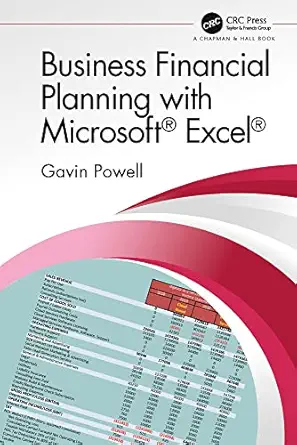
Business Financial Planning with Microsoft Excel
This guide offers practical techniques for creating your own financial plans in Excel, making it a flexible and cost-effective option. It’s perfect for business owners comfortable with spreadsheets who want tailored control over their financial data. However, it lacks real-world case studies or automation, and assumes familiarity with Excel formulas and functions. For those willing to put in the effort, this resource can be highly customizable, but it’s less suitable for owners seeking a plug-and-play solution or less spreadsheet-savvy entrepreneurs.
Pros:- Highly customizable financial models
- Cost-effective with no additional software costs
- Comprehensive coverage of business finance concepts
Cons:- No real-world case studies included
- Requires Excel proficiency and ongoing manual updates
- Less suited for automation or collaboration
Best for: Business owners comfortable with Excel and seeking customization
Not ideal for: Beginners or those preferring automated or cloud-based tools
Bottom line: A great resource for tech-savvy owners who want tailored financial planning in Excel, but not for those seeking simplicity.
Sage 50 Pro Accounting 2024 (1-User, 1-Year Subscription)
Sage 50 Pro Accounting 2024 is tailored for small businesses that need real-time, customizable reports and straightforward bill and invoice management. Its job costing features support cash flow tracking, and the inclusion of a one-year Sage Business Care plan ensures ongoing support. Compared with Sage Premium, it’s more streamlined but still retains most vital features. Its main downside is its desktop-only design and potential learning curve for new users. This makes it suitable for owners who want a trusted, hands-on accounting solution without cloud dependencies.
Pros:- Trusted industry support for over 40 years
- Real-time customizable reports for non-accountants
- Integrated bill/invoice management and job costing
Cons:- Limited to desktop use, no cloud access
- Requires renewal annually
- Potential learning curve for advanced features
Best for: Small business owners needing reliable, desktop-based accounting with customization
Not ideal for: Owners seeking mobile access or multi-user environments
- User License:1
- Subscription Duration:1 Year
- Software Type:Desktop Accounting Software
- Version:2024
Bottom line: A dependable desktop accounting tool for small businesses that value industry trust and custom reports.
Best Financial Software for Small Businesses
This guide offers a detailed comparison of major financial tools like QuickBooks, Xero, and FreshBooks. It’s ideal for business owners trying to decide which platform best fits their accounting, invoicing, and financial management needs. While it’s not an actual software product, it helps clarify features, pricing, and integrations across top options. The main limitation is that recommendations may become outdated as new features and products emerge, so owners should use it as a starting point rather than a definitive choice.
Pros:- Comprehensive comparison of leading financial tools
- Helps streamline accounting and invoicing decisions
- Provides insights into features and pricing
Cons:- Does not represent an actual software solution
- Recommendations may need updating as products evolve
- Less useful for hands-on management
Best for: Owners seeking an overview before choosing a specific financial software
Not ideal for: Those looking for an all-in-one solution or detailed tutorials
Bottom line: A valuable resource for small business owners to compare leading financial software options before making a selection.
How We Picked
Our selection process focused on small business needs, balancing feature set, ease of use, and value. We prioritized software with strong financial tracking, budgeting, and support options, favoring established solutions like Sage that have years of industry trust. For guides and DIY options, we looked for comprehensive content that empowers users with practical skills. We also considered platform compatibility, cost structure, and scalability to ensure each pick serves a different type of small business owner.
Factors to Consider When Choosing Financial Planning Software For Small Businesses
Selecting the right financial planning software depends on your business size, complexity, and preferred platform. Whether you need a robust desktop application like Sage, or a flexible DIY approach using Excel, understanding the core features and tradeoffs helps narrow down choices. Cost, mobility, and support are also key factors that influence your decision, especially as your business grows or changes.Understanding Your Business Needs
Start by evaluating how complex your financial management requirements are. Do you need detailed job costing, inventory tracking, or simple invoicing? Clarifying these needs helps determine if a full-featured desktop solution like Sage is necessary, or if a more straightforward tool like Excel or a comparison guide fits better.
Platform and Accessibility
Decide whether a desktop-only software suits your workflow, or if cloud-based or mobile options are essential. Desktop solutions like Sage 50 require installation and are less flexible for remote work, whereas Excel and cloud-supported tools offer mobility and collaboration benefits.
Cost and Subscription Models
Consider your budget for ongoing expenses. Sage’s annual subscriptions can add up, but offer detailed features and support. DIY options like Excel are free but demand more time investment. Understanding the total cost of ownership helps avoid surprises down the line.
Support and Learning Curve
Reflect on your comfort with learning new software. Sage provides dedicated support plans, but the learning curve can be steep for complex features. Excel guides provide self-paced learning, but require familiarity with formulas. Match your support needs with your technical skills.
Frequently Asked Questions
Is desktop accounting software still relevant in 2026?
Yes, desktop software like Sage remains relevant for small businesses that prioritize security, data control, and detailed features. While cloud solutions gain popularity, desktop applications offer reliable performance without internet dependency, making them suitable for certain businesses, especially those with sensitive data or limited internet access.
Can I switch from Excel to dedicated accounting software later?
Absolutely. Many small business owners start with Excel due to its flexibility and familiarity. As your business grows and your needs become more complex, migrating to dedicated software like Sage can streamline processes, improve accuracy, and provide better reporting. Most platforms support data import functions to facilitate this transition.
How much should I budget for small business financial software in 2026?
Budgeting depends on your chosen platform and features. Desktop solutions like Sage typically cost a few hundred dollars annually, while DIY approaches like Excel are free but may require investing in training or add-ons. Cloud-based or subscription services can range from monthly fees to annual payments, so consider both upfront and ongoing costs when planning your budget.
What are the main benefits of using Sage over other options?
Sage offers a long history of industry support, advanced features like job costing, inventory management, and detailed financial reports. Its desktop versions tend to be more feature-rich for complex accounting tasks, making it a preferred choice for businesses needing in-depth financial oversight and reliable, offline access.
Is online support necessary for small businesses?
While not mandatory, online support significantly reduces the learning curve and helps resolve issues quickly. For complex software like Sage, having access to expert assistance ensures you can fully leverage its features without frustration. Smaller or less experienced business owners might find this support invaluable, especially during initial setup and growth phases.
Conclusion
For small business owners prioritizing in-depth financial control and willing to manage desktop software, Sage 50 Premium or Pro versions are excellent choices. Entrepreneurs comfortable with spreadsheets or seeking budget-friendly, DIY solutions should consider Excel guides or basic tools. Those needing flexible, cloud-based options with collaboration features might explore other platforms not covered here. Ultimately, your decision hinges on your business size, technical skills, and future growth plans.